


If you're covering any part of your tuition out-of-pocket, you don't have to pay it all at once. We partner with Nelnet to offer an automatic payment plan for each active term, splitting your balance into equal installments. This article covers how to enroll, change, or cancel a plan.
Table of Contents
How Payment Plans Are Calculated
Nelnet calculates your plan using the outstanding balance on your account for the active term, then divides that balance into equal installments spread across the term.
If you pay your installments by credit or debit card, you'll pay a 2.85% transaction fee on each one. Paying from a bank account skips that fee.
Enrolling in a Payment Plan
Once registration and billing charges have been posted to your account for an active term, you'll receive a financial billing notification — and you're ready to enroll.
You can sign up any time before your third installment is due. For summer-term plans, the cutoff is your second installment due date.
To enroll, log into your Student Portal:
-
Click on Nelnet.
-
Verify your information, if you haven't already.
-
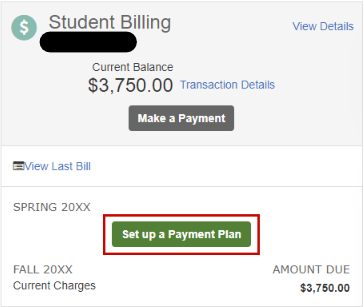
Under the active term, click Set Up a Payment Plan, choose your due date — the 5th, 10th, or 15th of the month — and follow the prompts to finish enrolling. You'll also add your current bank account information here, since each installment is deducted automatically on the date you choose.
Things to Know
-
Enrollment fee: Enrolling requires an upfront, non-refundable fee of $45 per plan. If you enroll in a payment plan for more than one term — say, Summer and Fall — you'll pay $45 for each, for a total of $90 in fees on top of your outstanding balance.
-
Payment plans don't carry over between terms. If you want a payment plan again next term, you'll need to enroll again once you're billed.
-
Failed payments: If a payment doesn't go through after two attempts, your plan is terminated for that term and won't be available again until the next one.
Changing Your Payment Plan
Already enrolled but need to adjust something? Nelnet lets you line up your installment due date with your payday, or hand your plan off to someone else.
Changing the Due Date
-
Log into your Nelnet account.
-
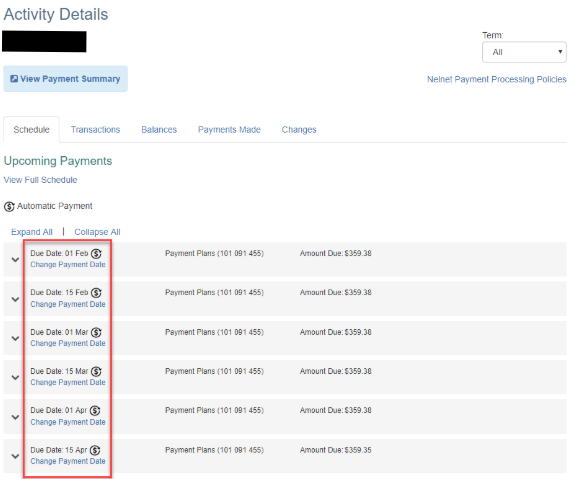
Select View Details on the home page.
-
Select Change Payment Date next to the due date you want to adjust.
Note: You can only change one payment date at a time.
Changing the Plan Owner
-
Log into your Nelnet account.
-
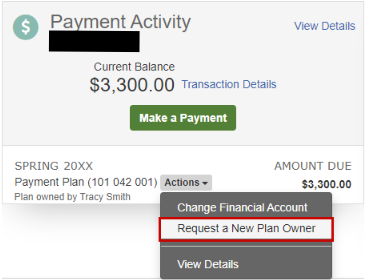
Select View Details on the home page.
-
From the Payment Plan Actions menu, select Request a New Plan Owner.
Once the transfer is complete, they take on responsibility for all remaining payments — including any installment already in progress.
Things to Know
-
New Plan Owners: Before the transfer can go through, the new plan owner must already have online access that you've granted them. Learn how to add a new authorized user to your account here. [LINK NEEDED]
-
Deadline: Submit any change — due date or plan owner — no later than 4 business days before your next scheduled installment.
-
Need help? Email us at [email protected], or book a 10-minute appointment with Student Financial Services.
Cancelling a Payment Plan
You're welcome to cancel your payment plan at any time. Cancelling doesn't cancel your financial obligation — you'll still owe your full balance for the term, just without the automatic, divided payments. Once cancelled, a plan can't be reactivated.
-
Log into your Nelnet account.
-
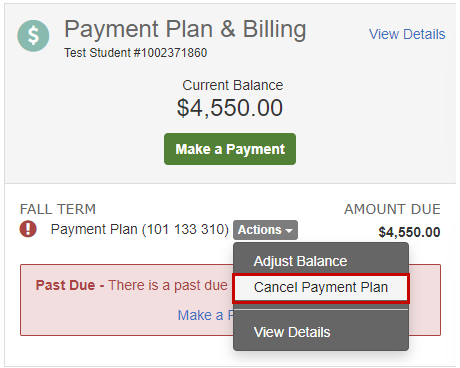
Select Cancel Payment Plan from the Actions dropdown on the home page.
-
Click Cancel Payment Plan to confirm.
Things to Know
-
Deadline: Cancel no later than 4 business days before your next scheduled installment. If you miss that window, the installment will still be pulled automatically from your linked bank account — it can't be stopped or changed at that point.
-
Enrollment fee: Your $45 enrollment fee isn't refunded when you cancel. If you set up a new plan later, you'll pay a new enrollment fee.
-
Automatic cancellation: Once you've paid your term's balance in full, your plan cancels automatically — no action needed.
-
Need help? Email us at [email protected], or book a 10-minute appointment with Student Financial Services.

